Tutorial: Build a Task Manager with Tenant-Specific Options
In this tutorial, you’ll build a task management application where different tenants (organizations) can customize their task priorities and statuses. By the end, you’ll have a working application where:
Developers define mandatory and optional default priorities and statuses
Tenant admins choose which optional defaults to enable and create custom options
End users see only the options their tenant has selected
The example project in the repository contains the complete working version of what you’ll build here. Reference it if you get stuck.
Note
This tutorial uses plain Django (no auto_prefetch, no crispy-forms) to keep dependencies minimal. See Customization for integrating those packages.
What you’ll build
A multi-tenant task manager with:
Tenant and User models
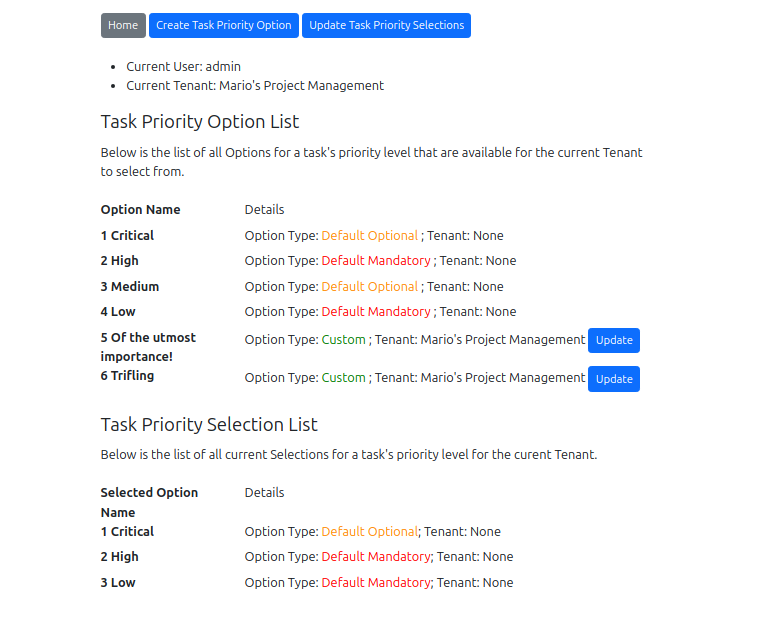
Task Priority options (Critical, High, Medium, Low) with customization per tenant
Task Status options (New, In Progress, Completed, Archived) with customization per tenant
Task model with ForeignKey fields to both option types
Forms for creating tasks, managing options, and managing selections
Views and templates that respect tenant boundaries
Prerequisites
Python 3.11+
Basic familiarity with Django models, forms, and views
A fresh Django project (or an existing one you want to add options to)
Step 1: Install and configure
Install the package:
pip install django-tenant-options
Add it to INSTALLED_APPS in your settings.py:
INSTALLED_APPS = [
    "django.contrib.admin",
    "django.contrib.auth",
    "django.contrib.contenttypes",
    "django.contrib.sessions",
    "django.contrib.messages",
    "django.contrib.staticfiles",
    "django_tenant_options",
    "tasks",  # your app
]
Step 2: Create your Tenant and User models
In tasks/models.py, start with a basic tenant model and a User model with a tenant ForeignKey:
from django.contrib.auth.models import AbstractUser
from django.db import models


class Tenant(models.Model):
    """Represents an organization in the SaaS application."""

    name = models.CharField(max_length=100)
    subdomain = models.CharField(max_length=100, unique=True)

    def __str__(self):
        return self.name


class User(AbstractUser):
    """Custom user with a tenant association."""

    tenant = models.ForeignKey(
        Tenant,
        on_delete=models.SET_NULL,
        null=True,
        blank=True,
        related_name="users",
    )
Point your AUTH_USER_MODEL setting at this custom user:
# settings.py
AUTH_USER_MODEL = "tasks.User"
And configure the tenant model for django-tenant-options:
# settings.py
DJANGO_TENANT_OPTIONS = {
    "TENANT_MODEL": "tasks.Tenant",
}
Step 3: Define Task Priority models
Now create the Option and Selection models for task priorities. Each set of customizable options uses a pair of models – an Option model that stores all available choices, and a Selection model that tracks which options each tenant has enabled.
Add to tasks/models.py:
from django_tenant_options.models import AbstractOption, AbstractSelection
from django_tenant_options.choices import OptionType


class TaskPriorityOption(AbstractOption):
    """Available task priority options."""

    tenant_model = "tasks.Tenant"
    selection_model = "tasks.TaskPrioritySelection"

    default_options = {
        "Critical": {"option_type": OptionType.OPTIONAL},
        "High": {"option_type": OptionType.MANDATORY},
        "Medium": {"option_type": OptionType.OPTIONAL},
        "Low": {},  # Empty dict defaults to MANDATORY
    }

    class Meta(AbstractOption.Meta):
        verbose_name = "Task Priority Option"
        verbose_name_plural = "Task Priority Options"


class TaskPrioritySelection(AbstractSelection):
    """Tracks which priority options each tenant has enabled."""

    tenant_model = "tasks.Tenant"
    option_model = "tasks.TaskPriorityOption"

    class Meta(AbstractSelection.Meta):
        verbose_name = "Task Priority Selection"
        verbose_name_plural = "Task Priority Selections"
Key points:
"High"and"Low"are mandatory – every tenant’s users will see them."Critical"and"Medium"are optional – each tenant chooses whether to enable them.Tenants can also create custom priorities (e.g., “Urgent”, “Blocked”).
The
Metaclass inherits fromAbstractOption.Meta/AbstractSelection.Metato preserve database constraints.
Step 4: Define Task Status models
Repeat the pattern for task statuses. Add to tasks/models.py:
class TaskStatusOption(AbstractOption):
    """Available task status options."""

    tenant_model = "tasks.Tenant"
    selection_model = "tasks.TaskStatusSelection"

    default_options = {
        "New": {"option_type": OptionType.MANDATORY},
        "In Progress": {"option_type": OptionType.OPTIONAL},
        "Completed": {"option_type": OptionType.MANDATORY},
        "Archived": {"option_type": OptionType.MANDATORY},
    }

    class Meta(AbstractOption.Meta):
        verbose_name = "Task Status Option"
        verbose_name_plural = "Task Status Options"


class TaskStatusSelection(AbstractSelection):
    """Tracks which status options each tenant has enabled."""

    tenant_model = "tasks.Tenant"
    option_model = "tasks.TaskStatusOption"

    class Meta(AbstractSelection.Meta):
        verbose_name = "Task Status Selection"
        verbose_name_plural = "Task Status Selections"
You now have two independent sets of customizable options. The same pattern works for any kind of option your tenants might need.
Step 5: Create the Task model
Add the Task model with ForeignKey fields to both option types:
class Task(models.Model):
    """A task assigned to a user with customizable priority and status."""

    title = models.CharField(max_length=100)
    description = models.TextField(blank=True)
    user = models.ForeignKey(
        "tasks.User",
        on_delete=models.CASCADE,
        related_name="tasks",
    )
    priority = models.ForeignKey(
        "tasks.TaskPriorityOption",
        on_delete=models.SET_NULL,
        null=True,
        blank=True,
        related_name="tasks",
    )
    status = models.ForeignKey(
        "tasks.TaskStatusOption",
        on_delete=models.SET_NULL,
        null=True,
        blank=True,
        related_name="tasks",
    )

    def __str__(self):
        return self.title
Tip
Using on_delete=models.SET_NULL with null=True means that if an option is ever hard-deleted, tasks won’t be deleted along with it.
Step 6: Run migrations and sync options
python manage.py makemigrations
python manage.py migrate
python manage.py syncoptions
The syncoptions command creates the default option records in your database. Verify with:
python manage.py listoptions
You should see the priority and status options listed with their types.
Step 7: Create forms
Create tasks/forms.py:
from django import forms
from django_tenant_options.forms import (
    OptionCreateFormMixin,
    OptionUpdateFormMixin,
    SelectionsForm,
    UserFacingFormMixin,
)
from .models import (
    Task,
    TaskPriorityOption,
    TaskPrioritySelection,
    TaskStatusOption,
    TaskStatusSelection,
)


# End-user form for creating/editing tasks
class TaskForm(UserFacingFormMixin, forms.ModelForm):
    class Meta:
        model = Task
        fields = ["title", "description", "priority", "status"]


# Forms for tenant admins to create custom options
class TaskPriorityCreateForm(OptionCreateFormMixin, forms.ModelForm):
    class Meta:
        model = TaskPriorityOption
        fields = ["name", "option_type", "tenant", "deleted"]


class TaskStatusCreateForm(OptionCreateFormMixin, forms.ModelForm):
    class Meta:
        model = TaskStatusOption
        fields = ["name", "option_type", "tenant", "deleted"]


# Forms for tenant admins to update/delete custom options
class TaskPriorityUpdateForm(OptionUpdateFormMixin, forms.ModelForm):
    class Meta:
        model = TaskPriorityOption
        fields = "__all__"


class TaskStatusUpdateForm(OptionUpdateFormMixin, forms.ModelForm):
    class Meta:
        model = TaskStatusOption
        fields = "__all__"


# Forms for tenant admins to manage which options are enabled
class TaskPrioritySelectionForm(SelectionsForm):
    class Meta:
        model = TaskPrioritySelection


class TaskStatusSelectionForm(SelectionsForm):
    class Meta:
        model = TaskStatusSelection
The form types and when to use them:
Form |
Mixin |
Used by |
Purpose |
|---|---|---|---|
|
|
End users |
Create/edit tasks with filtered option choices |
|
|
Tenant admins |
Create new custom priority options |
|
|
Tenant admins |
Update or soft-delete custom options |
|
|
Tenant admins |
Enable/disable optional priorities |
Step 8: Build views
Create tasks/views.py. Every form that uses a django-tenant-options mixin must receive a tenant argument:
from django.shortcuts import get_object_or_404, redirect, render
from .forms import (
    TaskForm,
    TaskPriorityCreateForm,
    TaskPrioritySelectionForm,
    TaskStatusCreateForm,
    TaskStatusSelectionForm,
)
from .models import (
    Task,
    TaskPriorityOption,
    TaskPrioritySelection,
    TaskStatusOption,
    TaskStatusSelection,
)


def task_list(request):
    tasks = Task.objects.filter(user=request.user)
    return render(request, "tasks/task_list.html", {"tasks": tasks})


def task_create(request):
    if request.method == "POST":
        form = TaskForm(request.POST, tenant=request.user.tenant)
        if form.is_valid():
            task = form.save(commit=False)
            task.user = request.user
            task.save()
            return redirect("task_list")
    else:
        form = TaskForm(tenant=request.user.tenant)
    return render(request, "tasks/form.html", {"form": form, "title": "Create Task"})


def task_update(request, task_id):
    task = get_object_or_404(Task, id=task_id)
    if request.method == "POST":
        form = TaskForm(request.POST, instance=task, tenant=request.user.tenant)
        if form.is_valid():
            form.save()
            return redirect("task_list")
    else:
        form = TaskForm(instance=task, tenant=request.user.tenant)
    return render(request, "tasks/form.html", {"form": form, "title": "Edit Task"})


def priority_list(request):
    options = TaskPriorityOption.objects.options_for_tenant(request.user.tenant)
    selections = TaskPrioritySelection.objects.selected_options_for_tenant(
        tenant=request.user.tenant
    )
    return render(request, "tasks/option_list.html", {
        "options": options,
        "selections": selections,
        "title": "Task Priorities",
        "create_url": "priority_create",
        "selections_url": "priority_selections",
    })


def priority_create(request):
    if request.method == "POST":
        form = TaskPriorityCreateForm(request.POST, tenant=request.user.tenant)
        if form.is_valid():
            form.save()
            return redirect("priority_list")
    else:
        form = TaskPriorityCreateForm(tenant=request.user.tenant)
    return render(request, "tasks/form.html", {"form": form, "title": "Create Priority"})


def priority_selections(request):
    if request.method == "POST":
        form = TaskPrioritySelectionForm(request.POST, tenant=request.user.tenant)
        if form.is_valid():
            form.save()
            return redirect("priority_list")
    else:
        form = TaskPrioritySelectionForm(tenant=request.user.tenant)
    return render(request, "tasks/form.html", {"form": form, "title": "Manage Priority Selections"})
The pattern is the same for status options – create analogous views for status_list, status_create, and status_selections.
Step 9: Create templates
Create a base template and a few page templates.
tasks/templates/tasks/form.html:
<!DOCTYPE html>
<html lang="en">
<head>
  <meta charset="utf-8">
  <title>{{ title }}</title>
</head>
<body>
  <a href="#main" class="skip-link">Skip to main content</a>
  <main id="main">
    <h1>{{ title }}</h1>

    {% if form.errors %}
    <div role="alert">
      <h2>Please correct the following:</h2>
      <ul>
        {% for field in form %}
          {% for error in field.errors %}
            <li><a href="#id_{{ field.html_name }}">{{ field.label }}: {{ error }}</a></li>
          {% endfor %}
        {% endfor %}
        {% for error in form.non_field_errors %}<li>{{ error }}</li>{% endfor %}
      </ul>
    </div>
    {% endif %}

    <form method="post" novalidate>
      {% csrf_token %}
      {{ form.as_p }}
      <button type="submit">Save</button>
    </form>
  </main>
</body>
</html>
Accessibility note:
{{ form.as_p }}does not link each input to its error text for screen readers. For production forms, pick one approach: either mix indjango_tenant_options.forms.AccessibleFormMixin(which setsaria-invalidand anaria-describedbypointing atid_{{ field.html_name }}_errors, so you hand-render that error container yourself), or usedjango-crispy-forms, which wires the associations with its own ids. Use one or the other, not both - combining them leaves a danglingaria-describedby.
tasks/templates/tasks/task_list.html:
<!DOCTYPE html>
<html lang="en">
<head>
  <meta charset="utf-8">
  <title>Tasks</title>
</head>
<body>
  <a href="#main" class="skip-link">Skip to main content</a>
  <main id="main">
    <h1>Tasks</h1>
    <p><a href="{% url 'task_create' %}">Create Task</a></p>
    <table>
      <caption>Your tasks</caption>
      <thead>
        <tr>
          <th scope="col">Title</th>
          <th scope="col">Priority</th>
          <th scope="col">Status</th>
          <th scope="col">Actions</th>
        </tr>
      </thead>
      <tbody>
        {% for task in tasks %}
        <tr>
          <td>{{ task.title }}</td>
          <td>{{ task.priority }}</td>
          <td>{{ task.status }}</td>
          <td><a href="{% url 'task_update' task.id %}">Edit<span class="visually-hidden"> {{ task.title }}</span></a></td>
        </tr>
        {% endfor %}
      </tbody>
    </table>
  </main>
</body>
</html>
tasks/templates/tasks/option_list.html:
<!DOCTYPE html>
<html lang="en">
<head>
  <meta charset="utf-8">
  <title>{{ title }}</title>
</head>
<body>
  <a href="#main" class="skip-link">Skip to main content</a>
  <main id="main">
    <h1>{{ title }}</h1>
    <p>
      <a href="{% url create_url %}">Create Custom Option</a> |
      <a href="{% url selections_url %}">Manage Selections</a>
    </p>

    <h2>Available Options</h2>
    <ul>
      {% for option in options %}
      <li>
        {{ option.name }}
        {# The text label below carries the meaning; color is only supplementary. #}
        {# Never remove the text label - color alone fails WCAG 1.4.1. #}
        {% if option.option_type == "dm" %}
          <span class="option-type option-type--mandatory">(Mandatory)</span>
        {% elif option.option_type == "do" %}
          <span class="option-type option-type--optional">(Optional)</span>
        {% else %}
          <span class="option-type option-type--custom">(Custom)</span>
        {% endif %}
      </li>
      {% endfor %}
    </ul>

    <h2>Currently Selected</h2>
    <ul>
      {% for selection in selections %}
      <li>{{ selection.name }}</li>
      {% endfor %}
    </ul>
  </main>
</body>
</html>
Accessibility note: The option type is shown with a text label (
(Mandatory),(Optional),(Custom)) so it does not rely on color (WCAG 1.4.1). If you add color via CSS, verify each color/background pair meets the 4.5:1 contrast minimum (WCAG 1.4.3) - for example, plainorange(#FFA500) text on white is only ~2.9:1 and fails. Define a.skip-linkand.visually-hiddenutility in your CSS:.skip-link { position: absolute; left: -9999px; } .skip-link:focus { left: 0; } .visually-hidden { position: absolute; width: 1px; height: 1px; margin: -1px; padding: 0; overflow: hidden; clip: rect(0 0 0 0); border: 0; }
Step 10: Wire up URLs
Create tasks/urls.py:
from django.urls import path
from . import views

urlpatterns = [
    path("", views.task_list, name="task_list"),
    path("create/", views.task_create, name="task_create"),
    path("<int:task_id>/edit/", views.task_update, name="task_update"),
    path("priorities/", views.priority_list, name="priority_list"),
    path("priorities/create/", views.priority_create, name="priority_create"),
    path("priorities/selections/", views.priority_selections, name="priority_selections"),
]
Include in your root urls.py:
from django.urls import include, path

urlpatterns = [
    path("admin/", admin.site.urls),
    path("tasks/", include("tasks.urls")),
]
Step 11: Test it out
Create a superuser:
python manage.py createsuperuser
Start the server:
python manage.py runserver
Log in via the admin at
http://127.0.0.1:8000/admin/Create a Tenant and assign your superuser to it (via the admin)
Visit
http://127.0.0.1:8000/tasks/priorities/– you should see the default prioritiesTry managing selections – enable/disable optional priorities
Create a custom priority option
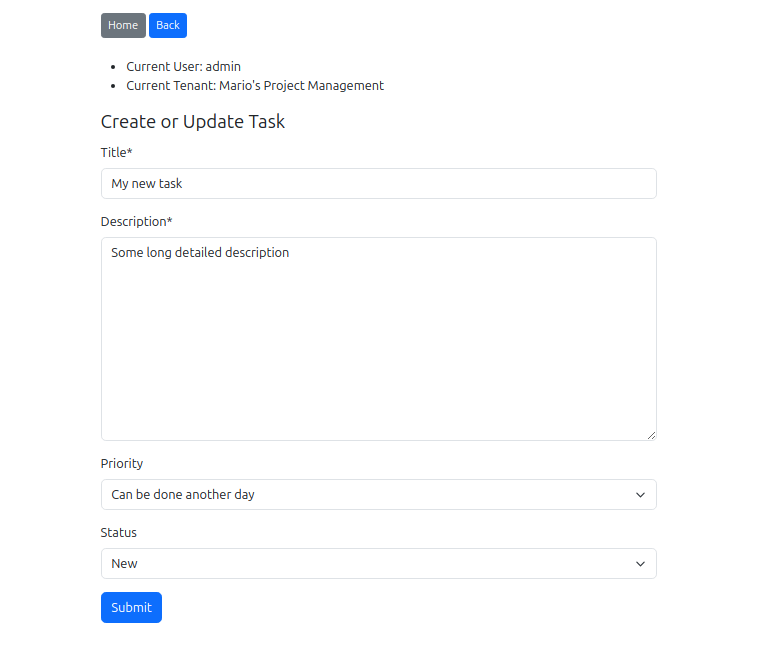
Create a task – the priority dropdown should show only the options your tenant has selected
Step 12: Validate your configuration
Run the validation command to confirm everything is properly set up:
python manage.py validate_tenant_options
You should see “All validations passed!” If there are warnings about missing constraints, check that your Meta classes inherit from the abstract model’s Meta.
What you’ve built
You now have a working multi-tenant task manager where:
Mandatory options (“High”, “Low”, “New”, “Completed”, “Archived”) are always available to every tenant
Optional options (“Critical”, “Medium”, “In Progress”) can be enabled or disabled per tenant
Tenants can create custom options visible only to their users
The
UserFacingFormMixinautomatically filters form choices to respect tenant selectionsSoft deletes preserve data integrity – deleted options don’t break existing records
Next steps
Models Guide – Custom managers, querysets, and advanced model configuration
Forms Guide – Deep dive into every form mixin
Views and Templates – Class-based views, admin integration, template patterns
Commands – Database triggers for extra integrity protection
Configuration Reference – Every available setting
Options Cookbook – Inspiration for option sets across industries